Shelter post-donation redesign
Shelter

A one-hour design challenge: improve one small step of Shelter’s donation journey. I chose the page people land on straight after donating, and redesigned it to show the impact of their donation and give them a clear next step.
It’s a concept, not shipped work, and it wasn’t commissioned by Shelter. With an hour to work in, the focus was on reasoning rather than polish, so that’s what this case study covers.
The brief
The challenge was to pick a single step of the journey, whether that was choosing an amount, filling in the form, or the post-donation experience, and improve it without redesigning the whole journey. It also had to work for people donating in very different situations: emotionally, quickly, on older devices or with assistive technology.
Choosing where to focus
I started by going through the full donation journey on the England site. Two things stood out first: the amount step didn’t say what a donation would pay for, and the journey had no visible steps. When I checked the Shelter Scotland and Shelter Cymru sites, both patterns were already there, so Shelter was clearly aware of them and possibly testing them. The post-donation page hadn’t had the same attention, so I focused there.
What was wrong with the existing page
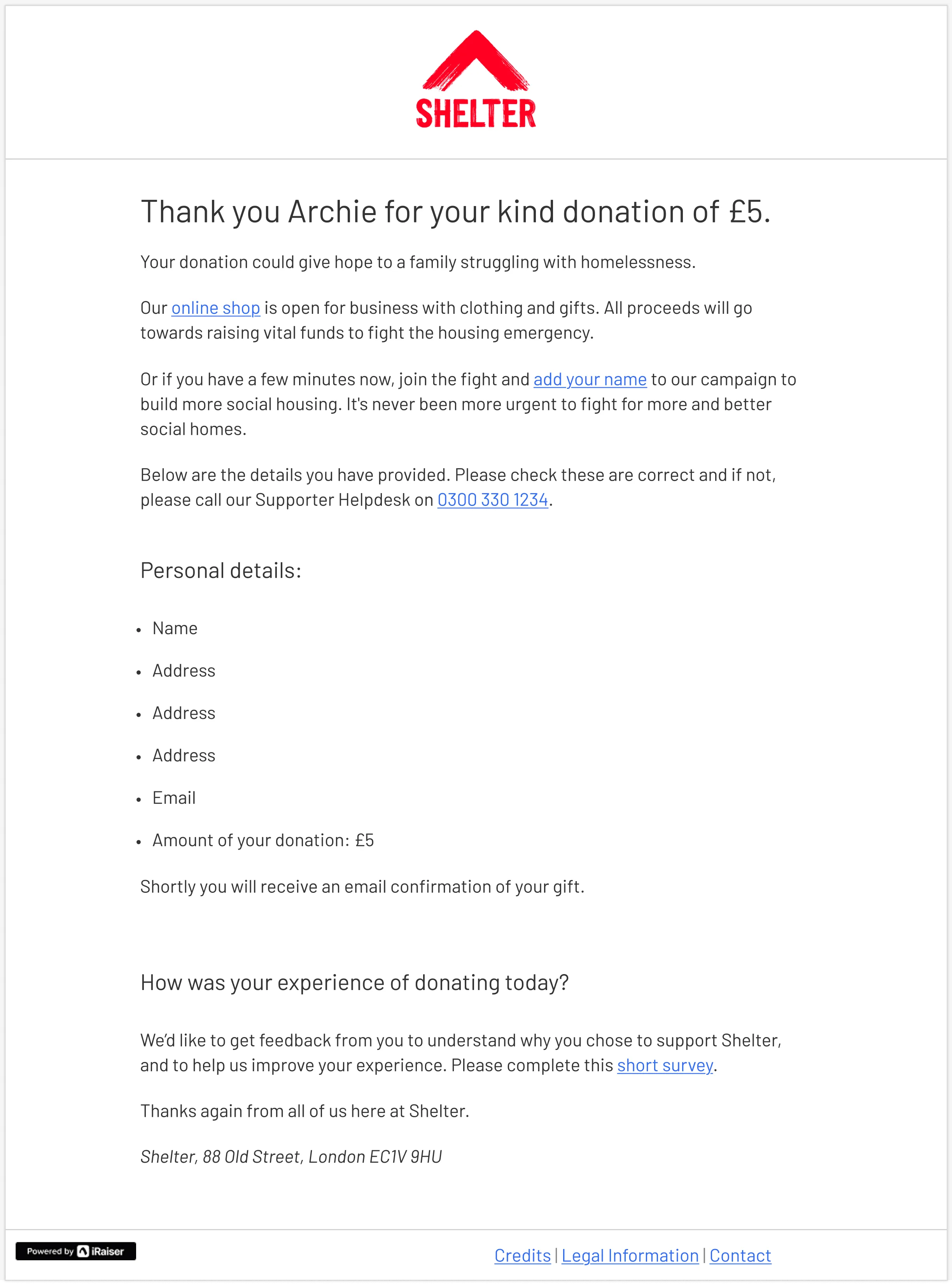
The page did the essentials. It confirmed the donation, listed the details and said an email confirmation was coming. But it was a single block of rich text. The personal details took up most of the page, the only impact message was one line (“Your donation could give hope to a family struggling with homelessness”), and the two next steps, the online shop and the housing campaign, were links in the middle of sentences. Straight after someone had given money, it read more like a receipt than a thank-you.
With no data or research available in an hour, I worked from an assumption rather than a finding: showing people the impact of their donation and giving them clear next steps would increase engagement after donating.
Before
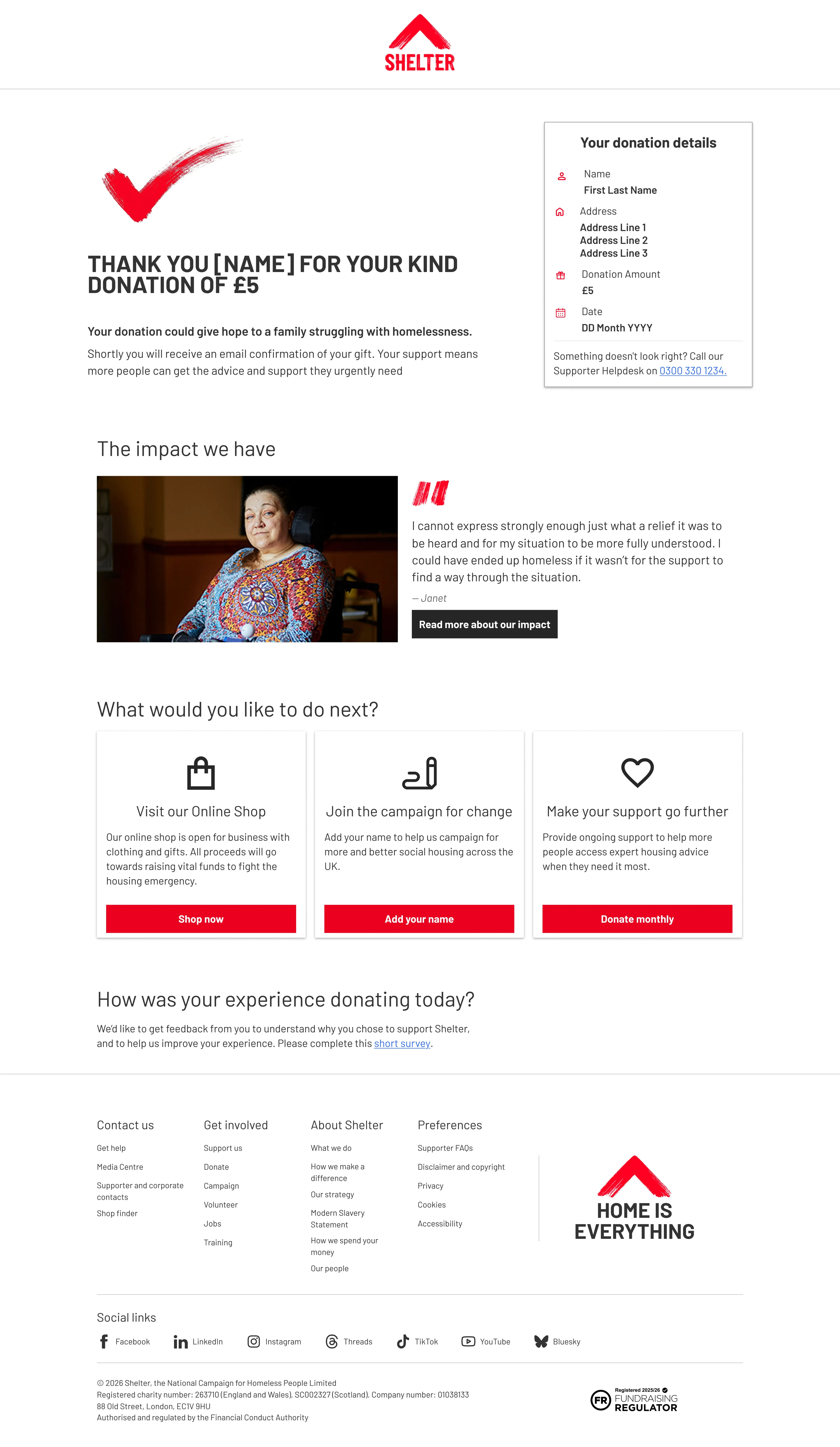
After
The redesign
I split the page into three sections, ordered by what I thought mattered most to someone who had just donated.
- Confirmation. A large tick, the thank-you heading and a summary card with the donation details. I moved the helpline number directly under the details, since incorrect details are the main reason someone would need to call.
- Impact. A real story from Shelter’s impact report, with Janet’s photo and quote, and a link to read more.
- Next steps. The shop and campaign actions moved out of the body copy into Shelter’s existing card pattern, with a third card for monthly giving. The feedback survey moved to the bottom.
I reused Shelter’s existing content and components wherever I could, which kept the design realistic and meant the hour went on structure rather than visual detail. I used the html.to.design Figma plugin to pull parts of the live site into Figma, including the next-step cards, and rebuilt the rest to match.
Key decisions
Impact before the asks. The end of the journey is the obvious place to ask for more. People have no task left, so it’s natural to point them somewhere. But the only thing on the existing page connecting their money to an outcome was one generic line. I placed a real person’s story directly after the confirmation, because feeling that a donation made a difference seemed more likely to bring someone back than another ask seconds after paying. It doesn’t raise money directly, which makes it the easiest section to cut, so it’s the first thing I’d want to test.
Monthly giving, but last. I went back and forth on whether to include monthly giving at all. Someone who has just chosen a one-off donation has already made a decision, and asking them to upgrade straight away risks feeling pushy. Leaving it out, though, removes the easiest route for anyone who does want to give more. I kept it as the last of three cards, so it’s available without leading the page.
No email sign-up. People are already asked about email updates during the donation form. Asking again would repeat a question they’d just answered, and add another block to a page I was trying to simplify.
Accessibility and measuring success
In an hour, accessibility meant structural decisions rather than anything tested. These were a clear heading hierarchy for screen reader navigation, plain language, and buttons that describe where they go instead of links inside sentences. I also grouped content so that someone donating quickly or in an emotional state can find what matters without reading everything. If this went to build, I’d write a spec covering heading levels, tab order and component behaviour, and stay close to the developers during implementation.
I’d track click-through on the next-step cards and the impact link, monthly giving conversions, campaign sign-ups, and responses to the existing post-donation survey. I’d start from existing analytics as a baseline, then test the riskiest assumptions first: how high the impact section sits, and whether the monthly giving card helps or puts people off.
Looking back
Three things I’d change with more time:
- Nobody owns this page but the platform. The footer says “Powered by iRaiser”, Shelter’s donation platform, which means Shelter probably can’t change the page directly. I didn’t account for that. A redesign of a third-party page is really a prioritised list of requests, and if I could only push for one change it would be the impact section, since the rest of the design is built around it.
- Three equal buttons. I criticised the original for having no clear primary next step, then gave the redesign three identical red buttons. One primary action, with the others secondary, would be more consistent with my own critique.
- Desktop only. The brief mentioned older devices, and the design only exists at desktop width. The mobile layout, especially where the details card sits in the reading order, is where most of the accessibility decisions would actually be tested.