Protect Your Patch
North Devon World Surfing Reserve
Protect Your Patch is a product that lets people sponsor a patch of the North Devon coastline, add their name and a message to it, and support the reserve’s conservation work. I led the UX on the MVP over three months as a pro bono project. North Devon World Surfing Reserve went on to present it at a global World Surfing Reserves event in California, and other reserves now want to use the same model for their own coastlines.
Context
North Devon is the UK’s first World Surfing Reserve, and the publicity around it meant a lot more people knew about the reserve and cared about protecting the coastline. What was missing was a simple way for them to do something about it. The reserve didn’t have much in place online to turn that attention into support, and nothing that let people contribute in a way that felt personal to them.
The project had a limited budget and a short timeline, and the back end was being built by an external partner.
Where the Idea Came From
The idea started as part of an agency pitch for a different client, which didn’t go ahead. The agency saw that it could work well for the reserve, and I was involved in the meetings where we worked out whether it would suit them and how it could be brought to life.
It gave the reserve something more personal than a standard donation page, because people would be sponsoring a specific bit of coastline they knew.
Working Without Research
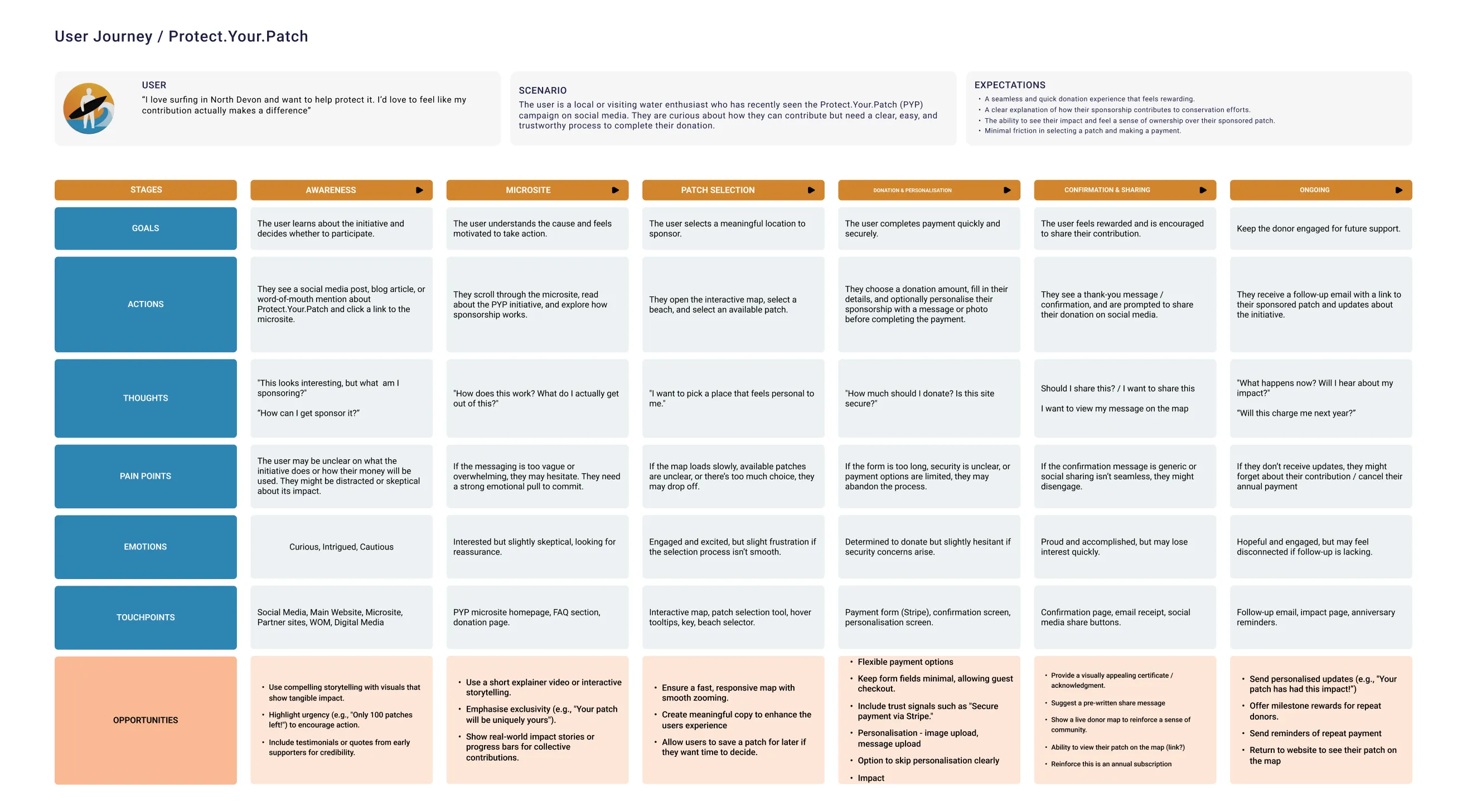
There wasn’t budget for user research, so I built the journey from conversations with the reserve team (two meetings before design started and two as the wireframes developed) and from my own knowledge of the audience as a surfer who uses these beaches. I treated it as a set of assumptions to test rather than research findings.
The main user was someone local or visiting who uses the water, cares about the coastline and wants to help, but needs to trust that their money will actually make a difference. From that, I set three goals: make it clear straight away what you’re sponsoring, reduce uncertainty before asking for money, and make the contribution feel personal.
Testing was informal. I took colleagues through the prototypes and checked the flows with the developers as I went. The journey map below sets out those assumptions across six stages, from first hearing about the project to staying involved after sponsoring.
Two Routes In From the Landing Page
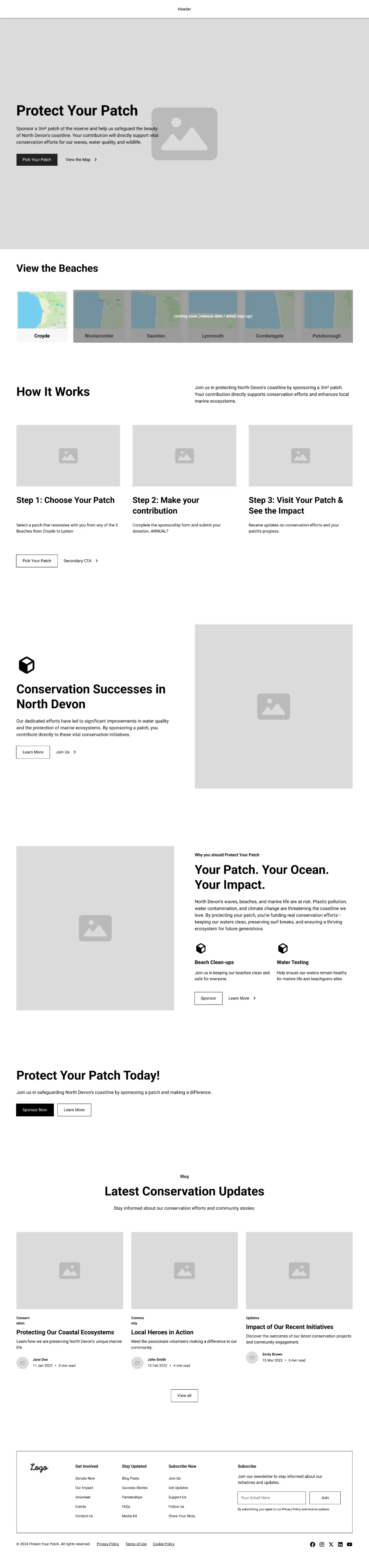
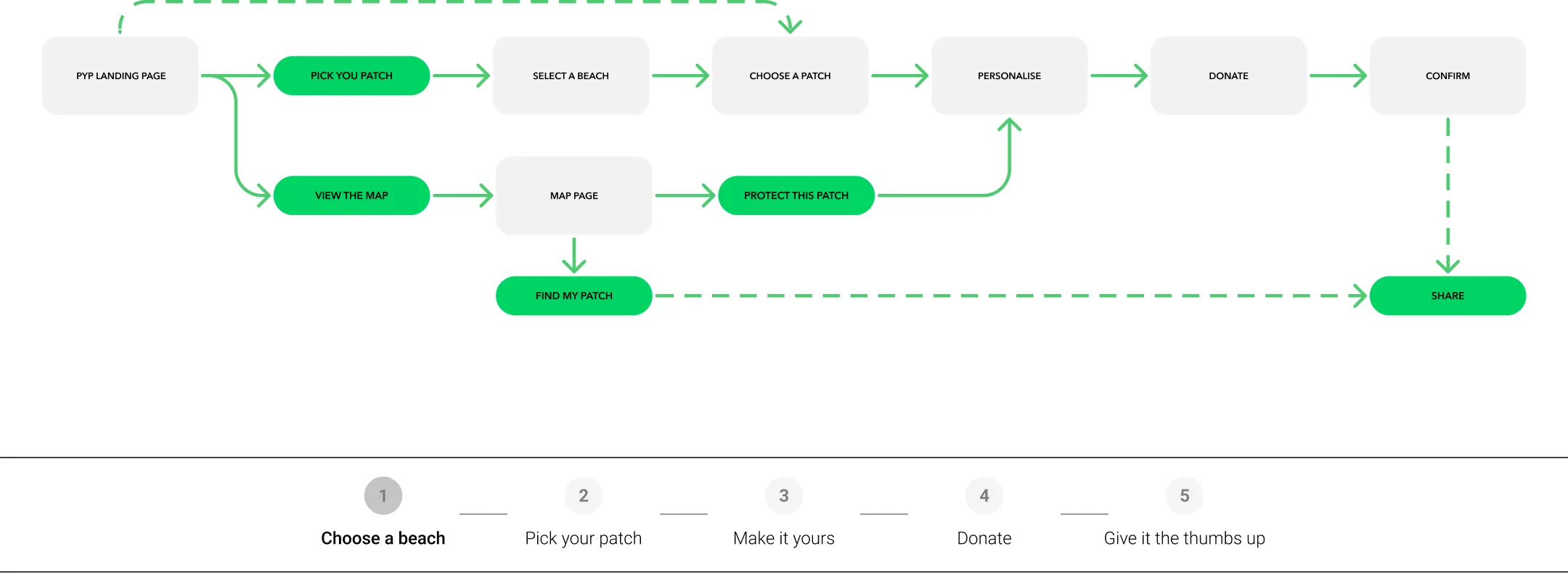
People arrive at the landing page with different intentions. Some are ready to sponsor straight away, some want to have a look around first, and people who have already sponsored want to find their patch again. With only one button, people who were still browsing would have been pushed into the sponsorship flow before they were ready. Two buttons with equal weight would have competed with each other and made the main action less clear.
So I made ‘Pick Your Patch’ the primary button and ‘View the Map’ the secondary one. That gave people who were ready a direct route in, and let everyone else explore the map or find their own patch first.
“This looks interesting, but what am I sponsoring?”
→ Explain it above the fold
Short intro copy explains what you’re sponsoring and how it helps the reserve.
→ Two clear next steps
‘Pick Your Patch’ for people ready to sponsor, and ‘View the Map’ for exploring or finding a patch you already sponsor.
“How does this work? What do I actually get out of this?”
→ A simple, transparent process
‘How it works’ explains the journey in three steps before asking for anything.
→ Show real impact
‘Conservation successes in North Devon’ shows how contributions are used, to build trust before people commit.
Personalising Before Paying
The sponsorship flow has five steps: choose a beach, pick your patch, make it yours, donate and share. Payment is the point where people are most likely to hesitate in a donation journey. If we’d asked for money straight after someone picked a patch, it could have felt like a transaction just as they were starting to feel connected to that spot. The downside of adding a step first is that it makes the journey to payment longer.
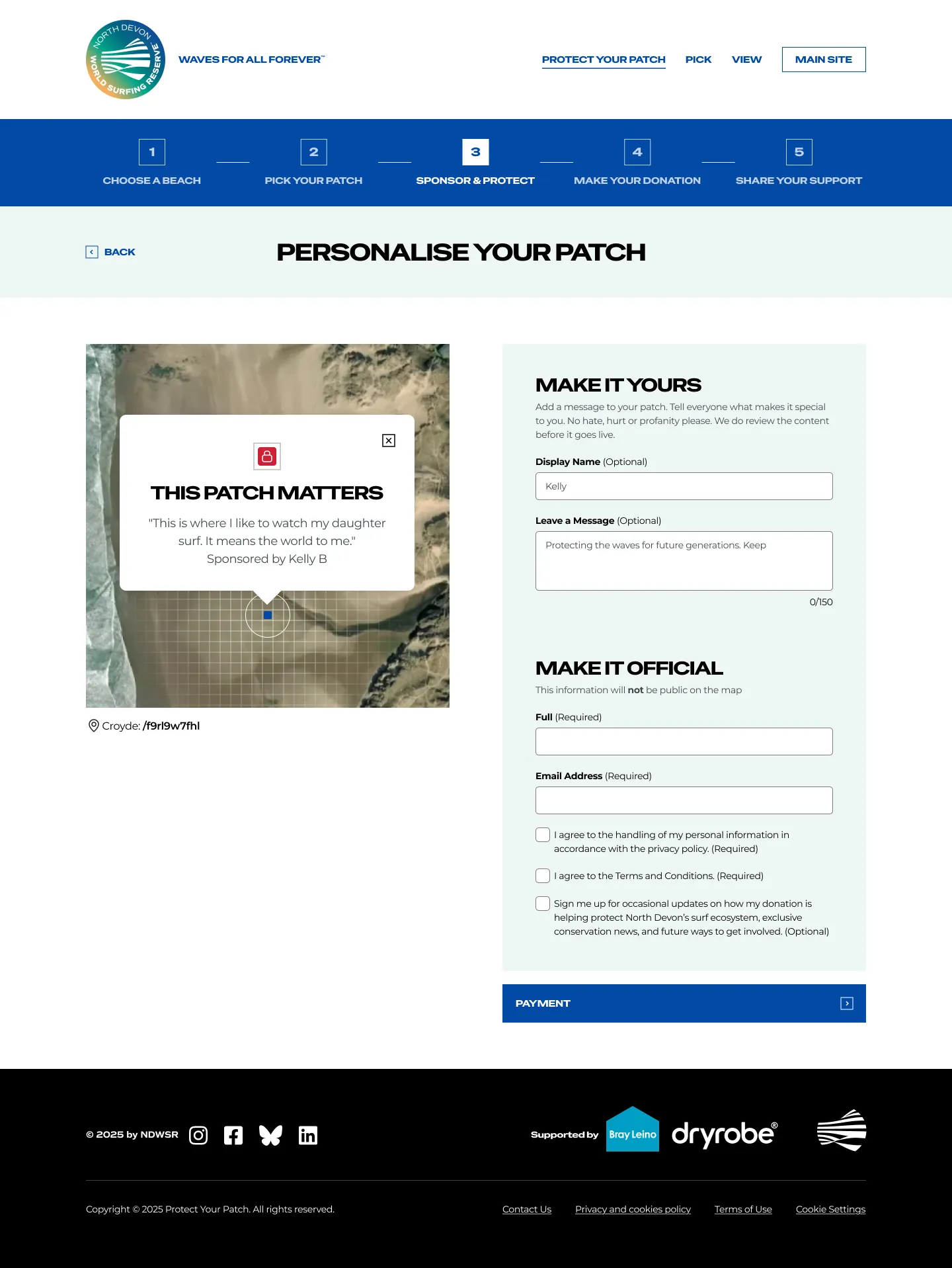
I decided to put ‘Make it yours’, where you add a display name and message to your patch, before ‘Donate’. By the time people get to payment, they’ve already made the patch their own, so donating feels like finishing something they’ve started.
Final Designs
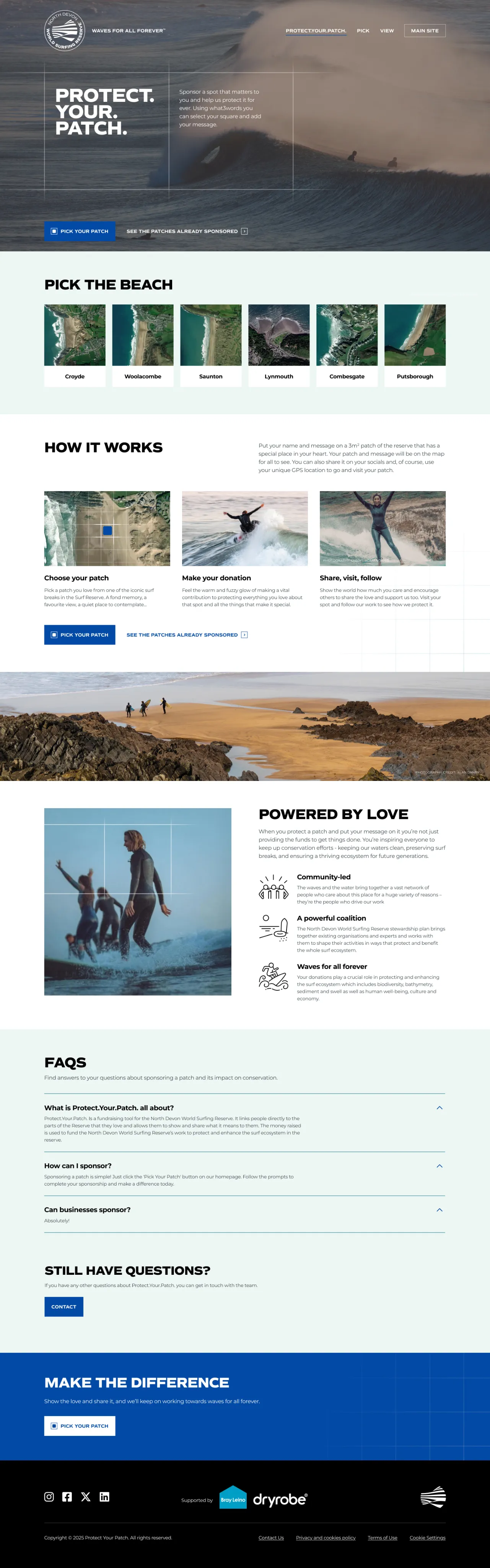
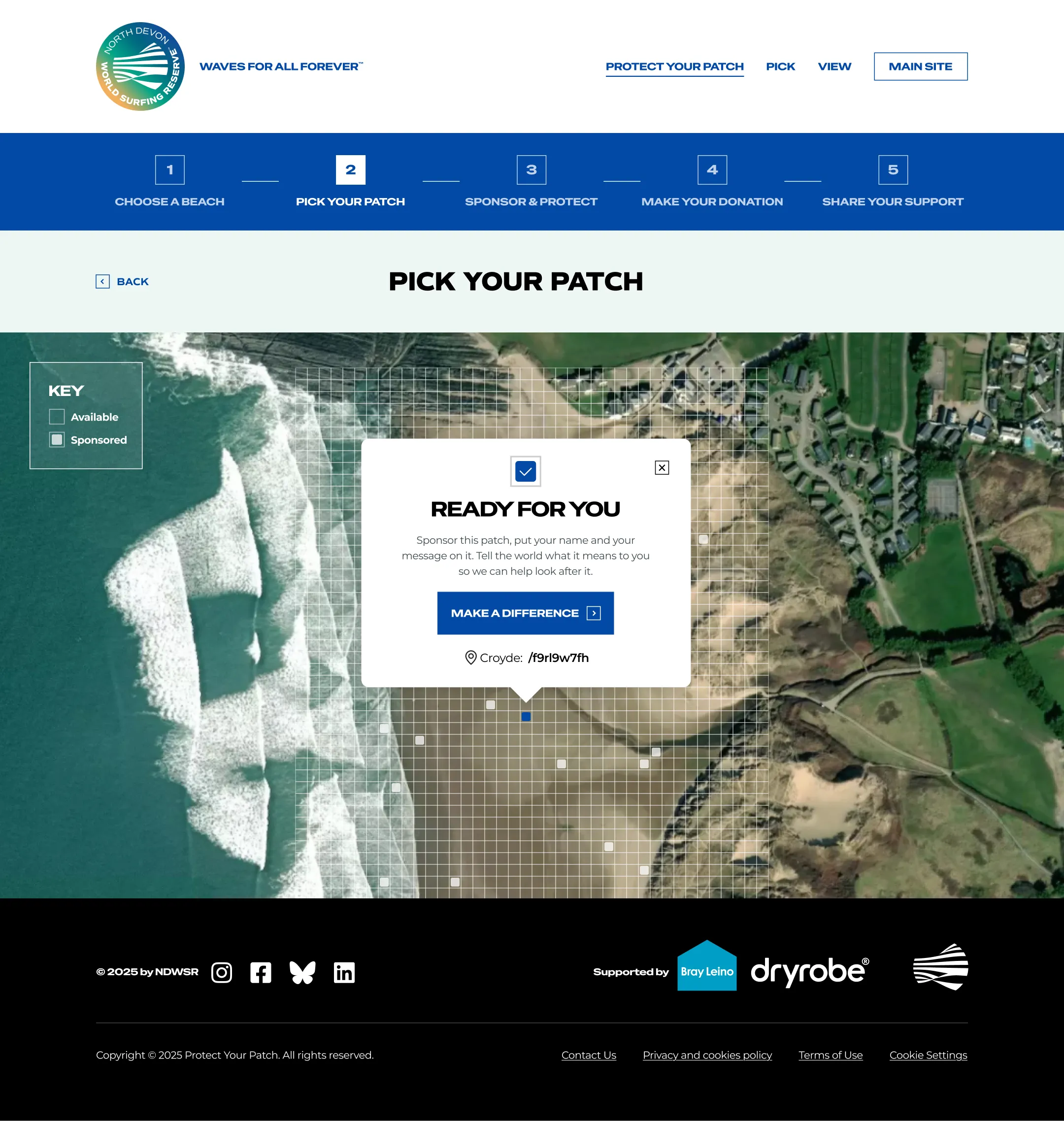
The final visual designs were done by a senior digital designer at the agency. My role at this stage was making sure the UX thinking and flows carried through.
Defining the MVP
For the MVP, the aim was one complete experience that could be built on later. It was designed around Croyde, the most popular beach in the reserve, with the other beaches shown greyed out as ‘coming soon’. Email capture let people sign up to hear about new beaches. The patch model works for any stretch of coastline, so new beaches can be added without redesigning the journey.
Reflection
This was my first time leading UX end-to-end, and it taught me a lot about deciding what ‘enough’ looks like for an MVP, like focusing on Croyde and showing the other beaches as ‘coming soon’.
It’s also taught me that a good idea isn’t always enough to get something built. Protect Your Patch hasn’t launched yet. Early on, that was down to funding for the back-end build, and it has since been held up by decisions about how the model is taken forward now that other reserves are interested. Most of that has been outside the project team’s control, which has been frustrating, but it’s been a useful lesson in how much affects whether a product actually ships.
If it goes ahead, the first thing I’d want to do is test it with real supporters, and look at how many people choose ‘Pick Your Patch’ over ‘View the Map’, and how many drop out between ‘Make it yours’ and ‘Donate’. Informal testing with colleagues was useful, but it can’t replace watching people who care about the coastline actually sponsor a patch.